Runtime Environments
A RuntimeEnvironment is a platform environment: defined in the cluster by
an administrator, offered to everyone, and launched by name. The other kind —
a User Environment, which an account builds and versions itself — is not a
custom resource at all; see Platform and User
Environments below.
Short names: rte, re, renv. The complete specification is available
here,
and the sections below show examples.
Runtime Environments Specification
| Field | Required | Meaning |
|---|---|---|
title | yes | What the Runtime Launcher shows |
dockerImage | yes | The image a runtime of this environment runs |
home | yes | Where the image's user lives, and the root home folders, Contents and Volumes mount under: /home/datalayer. See The home |
language | yes | The kernel language, such as python |
resourcesRanges | yes | The Pod's recommended requests and limits — cpu, memory, ephemeral-storage, nvidia.com/gpu — under default. A Runtime Pool that sets its own resources overrides them |
description, icon | For the launcher: prose, and an icon slug (ai-agent resolves to AiAgentIcon from @datalayer/icons-react) | |
env | Environment variables, name and value. Also added to remote runtimes — see injection | |
capabilities | What the environment can do — agent, sandbox, mcp, home-folder, gpu, snapshot, checkpoint, local-bridge-mount. A launch that requires one the environment does not declare is refused before the Pod exists | |
sizeClass | small, medium or large. Derived from the resources when absent — small up to 1 CPU and 2Gi, medium up to 4 CPU and 8Gi, large beyond or with a GPU | |
kernel | givenNameTemplate, the template for a runtime's given name | |
snippets, example | Code the launcher offers, and a URL to an example | |
contents | The Runtime Contents it brings, by uid — see below | |
contents_build | Files baked into the image at build time: each a source, a destination path and a sha256 the fetched file must have. The build fails on a mismatch, and the image lists what it carries at /etc/datalayer/environment-contents.json |
Contents: selected by uid
An Environment names what it brings by the spec.uid of each
Runtime Content, and where it appears in the runtime:
spec:
  contents:
    - uid: 01M0YX0MXYD8YZVMJW016KTB4M # nfs-models-oss-content
      mount: /home/datalayer/models/datalayer-oss
      permissions: ro
permissions narrows the content's own access and is never wider than it;
absent means the content's own. The name after # is a comment for the
reader. An entry written the earlier way — name: instead of uid: — is
not a selection: the Operator refuses to spawn any runtime of that
Environment, pool pods included, and says so at startup and on every
reconcile (plane logs datalayer-operator | grep startup_check). See
the Operator page
for what is resolved and mounted at launch.
Apply the platform definitions
The platform's Environments live in the Services repository under
plane/etc/specs/runtime-environments/{prod,dev,oss}/. They are applied
with kubectl — no Plane command applies them, and redeploying the Operator
leaves them as they are — after the Runtime Contents they select:
kubectl apply -n datalayer-runtimes -f plane/etc/specs/runtime-contents/
kubectl apply -n datalayer-runtimes -f plane/etc/specs/runtime-environments/prod/
kubectl get runtime-environments -n datalayer-runtimes -o jsonpath='{range .items[*]}{.metadata.name}{"\t"}{.spec.contents[*].uid}{"\n"}{end}'
Each Environment must list the uids it selects; the Operator picks a re-applied Environment up within a minute, without a restart.
Manage the Environments
kubectl get runtime-environments.datalayer.io -A
kubectl get runtime-environments.datalayer.io -o yaml -A
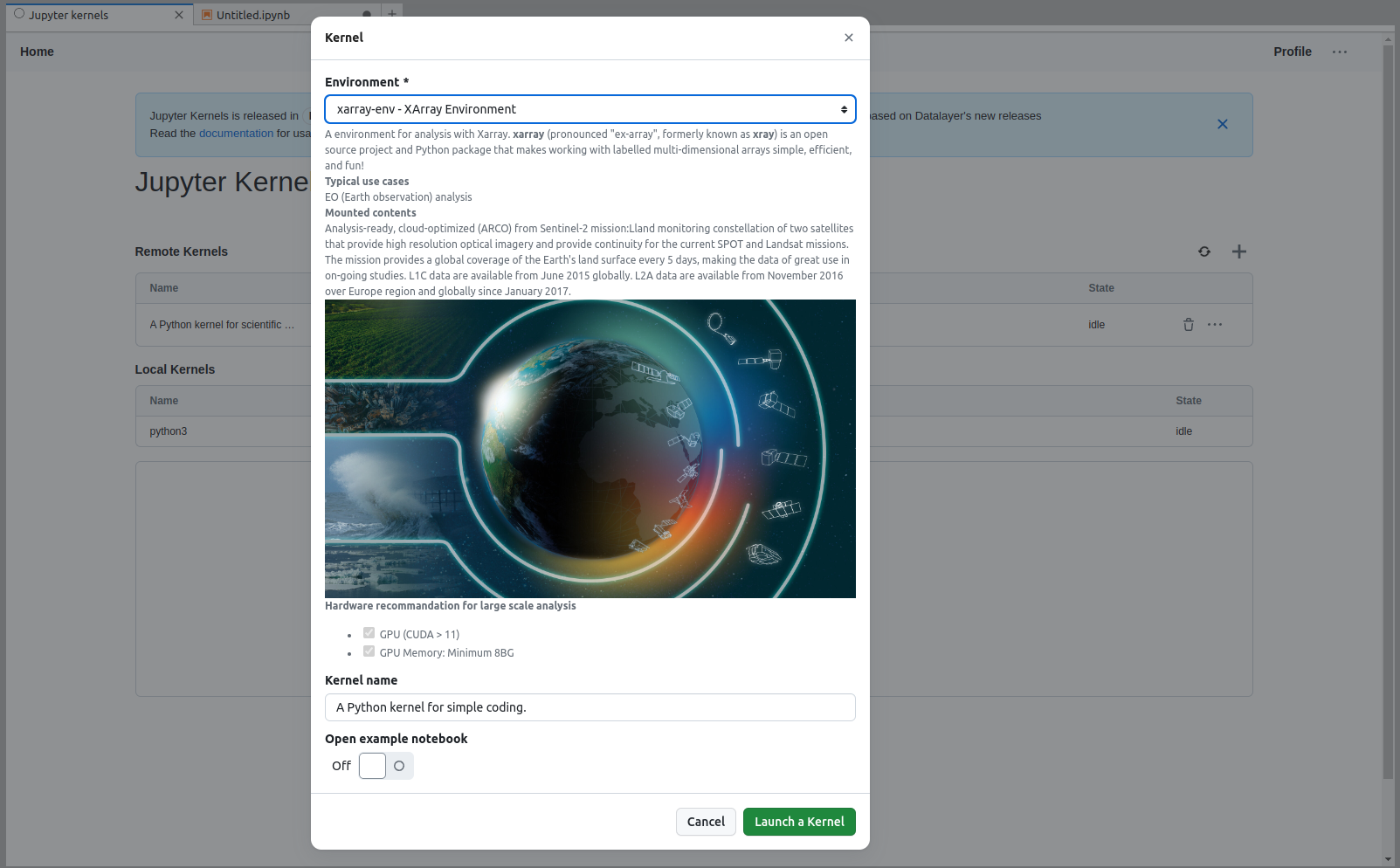
Runtime Launcher
The information provided in the specification is used when by the Runtime Launcher.
Platform and User Environments
The Platform Administrator is responsible for provisioning the Platform Environments.
User Environments, which accounts and organizations define, version and build themselves, are on the Environments page, with what of them runs today.
Nothing unsigned runs
Once a User Environment's build produces an artifact — an image under environments/ in the registry — the Operator will not start a pod from it, warm-pool pods included, unless Datalayer's own signature is on that exact digest (PLAN_ENV.md E1-09, D-11). This runs today, code-complete and unit-tested, ahead of the first artifact it will ever check: it fails closed on purpose, so there is nothing to switch on later.
- What is checked, and what is not. Only a reference under
environments/— the pipeline's own namespace — is checked at all. A platform image on OVH is not signed and launches unchecked until E1-28 moves the platform environments onto the same pipeline; checking them today would stop every runtime on the plane. - A tag is refused before a signature is even asked for. A signature is on content, and a tag can be moved after it was verified, so an
environments/image is only ever launched by its digest —…@sha256:<hex>, never…:<tag>. - The check.
cosign verify --key <the KMS key> <image>, run once per digest and cached — a pass for an hour (a digest's verdict cannot change, it is content), a refusal for 30 seconds (the usual reason is a signature not pushed yet, and a pool retrying for an hour on a stale no would outlive the problem). - It fails closed. No
DATALAYER_ENVIRONMENTS_KMS_KEYset on the Operator, nocosignbinary, a check that cannot be run, one that never answers: every one of these refuses the pod, naming which. "We could not check" is never an answer that starts a container. - What a refusal looks like, in the Operator's log and in the pod's own event:
DL_ENV_SIGNATURE_INVALID, naming the image, the digest, and the reasoncosigngave — a missing signature, one from another key, or a tampered payload. - Deploying it: set
DATALAYER_ENVIRONMENTS_KMS_KEY(the sameawskms:///alias/…cosign itself takes) andDATALAYER_ENVIRONMENTS_VERIFY_TIMEOUTif the default 20 seconds is wrong for this plane, and make surecosignis on the Operator image'sPATH— nothing else to configure. Until the key is set, everyenvironments/pod is refused, which is expected: there is no artifact to launch before E1-06 deploys the registry and the builder.
Deploying the builder
Three pieces, each with its own page, deployed in this order:
- The registry.
clouder aws ecr-environments deploy— the ECR repositories, the KMS keys, the three IAM principals (builder, puller, reader) and their Secrets, and the pull-secret refresher. Everything below reads from this; nothing here repeats it. - The build pool.
plane up datalayer-buildkit: one rootlessbuildkitdindatalayer-builds, reached only by the durableenvironmentsworker over mTLS. BuildKit covers what it needs first (cert-manager, and a build node you label and taint by hand), the builder's AWS permissions, and the fixes a real install needed. - The
environmentsqueue, in the Environments page's own deploy order (E1-12) — IAM before Runtimes' own launch route accepts the environment on a reservation, Runtimes before Durable starts builds against it, Durable'senvironmentsqueue Deployment last, once its own three pieces are in place:DATALAYER_BUILDKIT_ADDRand theDATALAYER_BUILDKIT_TLSCERT/TLSKEY/TLSCACERTtrio (a volume mount of the client certificate the build pool's own chart already minted, cross-namespace, intodatalayer-durable), andecr-environments-builder's AWS credential (envFrom, never through--set— the same reason the DBOS connection string is read from a Secret and not passed as a value).plane up datalayer-durablecarries all of it once the rc hasDATALAYER_ECR_ENVIRONMENTS_REGION/REGISTRY,DATALAYER_BUILDKIT_ADDRandDATALAYER_ENVIRONMENTS_KMS_KEYset. The same rc needs the three keys the Environments page's deploy order lists,DATALAYER_RUNTIMES_DURABLE_API_KEY,DATALAYER_DURABLE_RUNTIMES_API_KEYandDATALAYER_IAM_API_KEY, withplane up datalayer-runtimesrun after them too: Runtimes checks the second and reserves builds with the third.
Verify the chain reaches the daemon before trusting a build to it:
kubectl -n datalayer-builds rollout status deployment/datalayer-buildkit
kubectl -n datalayer-builds exec deploy/datalayer-buildkit -- \
  buildctl --addr=unix:///run/user/1000/buildkit/buildkitd.sock debug workers
kubectl -n datalayer-durable get deploy datalayer-durable-environments \
  -o jsonpath='{.spec.template.spec.containers[0].env[?(@.name=="DATALAYER_BUILDKIT_ADDR")].value}'
Draining builders before a roll
Restarting datalayer-buildkit kills the build it is running. BuildKit gives the check for builds in flight to run first.
The home
Every Environment declares spec.home, where its image's user lives: /home/datalayer for every platform image, as sandbox-contract/v1 fixes it. The Operator mounts home folders, Contents and Volumes under it, and sets it as the Jupyter container's working directory. It refuses to spawn any runtime of an Environment that declares no home, or a different one, because the Node Mount Gateway delivers under /home/datalayer whatever the image expects. The custom resource requires the field, so an Environment without it is refused when it is applied.
What a sandbox then finds there — the working directory, the Home Folders, where the Environment's contents land — is A sandbox's home on the Runtimes page.
Moving the platform to /home/datalayer
The platform's images, Environments and Operator left the Jupyter images' jovyan home for /home/datalayer in one change, the identity of sandbox-contract/v1. On each plane it ships as one cut, in the order below, and rolls back the same way. Run everything from the Services repository with the plane's rc sourced, source ~/.datalayer/datalayerrc-r1 for r1.
Before the cut
-
Release
datalayer-corewith the new home. The Operator and Contents images installdatalayer-corefrom PyPI, and an Operator on a core whoseRUNTIME_HOME_MOUNT_PATHis still the old home refuses every Environment that declares/home/datalayer. Cut the release, raisedatalayer-coreto it incommon/pyproject.tomlandcontents/pyproject.toml, and give the Operator and Contents images new tags: in their Makefiles and in the--set …image=lines ofplane/datalayer_plane/sbin/up.sh. Then the cut overwrites no image, and a rollback is the previous tags. Check the wheel:pip download datalayer-core==<version> --no-deps -d /tmp/coreunzip -p /tmp/core/datalayer_core-<version>-*.whl datalayer_core/contents_node_mount_gateway.py | grep RUNTIME_HOME_MOUNT_PATH -
Build and push the runtime images, each after its base:
jupyter-python0.2.0, thenjupyter-python-cuda0.3.0, thenjupyter-ai-cuda0.3.0 andjupyter-pytorch-cuda0.1.0, andjupyter-geocat0.1.0 andjupyter-server0.1.0 onjupyter-python. The tags are in each Makefile. The CUDA images,jupyter-python-cuda,jupyter-ai-cudaandjupyter-pytorch-cuda, matter only on a plane with GPU nodes. No Datalayer plane has one today, so leave them out there: their Environments are applied with the rest and cannot be scheduled on their GPU request, as before the move.# With GPU nodes: jupyter-python jupyter-python-cuda jupyter-ai-cuda jupyter-pytorch-cuda jupyter-geocat jupyter-serverfor image in jupyter-python jupyter-geocat jupyter-server; do(cd plane/etc/dockerfiles/$image && make build-dev push) || breakdonejupyter-pytorch-cudapre-downloads a gated model only whenHF_TOKENis set. Its Makefile passes the token as thehf_tokenbuild secret, so it never reaches a layer. Without it, the image builds without the model. Check each image before going on: nothing is left in the old home.docker run --rm --entrypoint tini $DATALAYER_DOCKER_REGISTRY/jupyter-python:0.2.0 -- sh -c 'id; ls -A /home'# uid=1000(datalayer) gid=100(users) groups=100(users)# datalayer -
Record what runs, for the rollback: the Operator's and Contents' images by digest, and the definition and Environments as they are.
kubectl get pods -A -o jsonpath='{range .items[*]}{.metadata.namespace}/{.metadata.name}{"\t"}{.status.containerStatuses[0].imageID}{"\n"}{end}' | grep -E 'operator|contents' > before-images.txtkubectl get runtime-environments -n datalayer-runtimes -o yaml > before-environments.yaml -
Pre-pull the new images on the runtime nodes, so the first launches do not wait for them:
plane k8s-prepull-cpu, andplane k8s-prepull-gpu-cudaon a plane with GPU nodes.
The cut
-
The definition, which now requires
spec.home. The Operator chart carries the same definition, so a laterp reup operatorkeeps it.kubectl apply -f operator/etc/crd/runtime-environment.yaml -
The Environments, each declaring
home: /home/datalayerand the new image.oss/llama-cpp-cuda.yamlstays out of the cut: its image cannot be rebuilt, it declares no home, and the definition refuses it.kubectl apply -n datalayer-runtimes -f plane/etc/specs/runtime-environments/prod/On a plane that runs the dev or oss set, apply that directory the same way, leaving
llama-cpp-cuda.yamlout. -
The Operator, built on the released core. Until it runs, launches of the new Environments get their mounts in the wrong home, so keep steps 2 and 3 close together.
(cd plane/etc/dockerfiles/datalayer-operator && make build-dev push) && p reup operatorplane logs datalayer-operator | grep startup_check -
Contents, built on the released core. Its API, worker and bridge share the image.
(cd plane/etc/dockerfiles/datalayer-contents && make build-dev push) && p reup contents -
The warm pools, whose idle pods still run the old images until they are replaced. Replace only the
availableones. A pool podassignedto somebody is that person's running runtime, and it keeps its old image until the session ends.kubectl delete pods -n datalayer-runtimes -l runtime-pools.datalayer.io/pod-status=available -
Jupyter Server and the jump hosts, when they move in the same window: raise
jupyter-serverto 0.1.0 andsshto 0.0.7 inplane/datalayer_plane/sbin/up.sh, editing the--set …image=lines by their pattern, and reinstall those releases withp reup. The jump host's login becomesdatalayer@.
Check
Launch a runtime of every Environment the plane can schedule. Without GPU nodes, the GPU Environments cannot be scheduled, whatever their home, and an Environment that no pool names cannot be spawned at all. In each, id answers uid=1000(datalayer) gid=100(users), echo $HOME answers /home/datalayer, ls /home lists datalayer alone, and the home folder and the Environment's Contents are under /home/datalayer.
A runtime from a pool is one pod of several containers, and the Environment's image runs in the container named jupyter; the agent-runtimes container beside it keeps HOME=/tmp. Claim a runtime, read that container, and terminate the runtime by its pod name:
datalayer sandboxes create datalayer --environment ai-agents-env
kubectl exec -n datalayer-runtimes runtime-<id> -c jupyter -- sh -c 'id; echo $HOME; ls -A /home; find $HOME -maxdepth 2 -type l'
datalayer agents delete runtime-<id>
The Contents arrive as links under the home, datasets/<name> and models/<name>, each pointing at its mount under /mnt/datalayer. If sandboxes create has not returned after a minute, the runtime is usually already there: the newest assigned pod of the pool is yours.
Roll back
Everything goes back together, the definition first, because the previous Environments declare no home. Take the definition and the Environments from the Services revision before the move, e3df065f^:
git show e3df065f^:operator/etc/crd/runtime-environment.yaml | kubectl apply -f -
git archive e3df065f^ plane/etc/specs/runtime-environments | tar -x -C /tmp/before
kubectl apply -n datalayer-runtimes -f /tmp/before/plane/etc/specs/runtime-environments/prod/
Then put the Operator and Contents back on their previous tags, the --set …image= lines of up.sh before the move, whose digests before-images.txt records. Run p reup for both, and replace the warm pool pods again. The previous runtime images keep their tags and are never overwritten by the move.
Simple Environment Example
cat <<EOF | kubectl apply -f -
apiVersion: datalayer.io/v1
kind: RuntimeEnvironment
metadata:
  name: python-simple-env
  namespace: datalayer-runtimes
  labels:
    project.datalayer.io/name: poc
spec:
  title: Python Simple Environment
  description: A Python environment for simple coding.
  language: python
  owner: datalayer
  visibility: public
  example: https://raw.githubusercontent.com/datalayer/examples/e8390ce9eb4aee36721eb6e7cdc31ef8455ff359/python-simple/python-simple-example.ipynb
  dockerImage: ${DATALAYER_DOCKER_REGISTRY}/datalayer/jupyter-python:0.2.0
  home: /home/datalayer
  kernel:
    givenNameTemplate: A Python kernel for simple coding.
  resourcesRanges:
    default:
      requests:
        cpu: "250m"
        memory: "64Mi"
      limits:
        cpu: "500m"
        memory: "512Mi"
EOF
Xarray Environment Example
cat <<EOF | kubectl apply -f -
apiVersion: datalayer.io/v1
kind: RuntimeEnvironment
metadata:
name: xarray-env
namespace: datalayer-runtimes
labels:
project.datalayer.io/name: dev
spec:
title: XArray Environment
description: |
A environment for analysis with Xarray. **[xarray](https://github.com/pydata/xarray)** (pronounced "ex-array", formerly known as **xray**) is an open source project and Python package that makes working with labelled multi-dimensional arrays simple, efficient, and fun!
**Typical use cases**
EO (Earth observation) analysis.
**Mounted contents**
Analysis-ready, cloud-optimized (ARCO) from Sentinel-2 mission:Lland monitoring constellation of two satellites that provide high resolution optical imagery and provide continuity for the current SPOT and Landsat missions. The mission provides a global coverage of the Earth's land surface every 5 days, making the data of great use in on-going studies. L1C data are available from June 2015 globally. L2A data are available from November 2016 over Europe region and globally since January 2017.

**Hardware recommandation for large scale analysis**
- [x] GPU (CUDA > 11)
- [x] GPU Memory: Minimum 8BG
language: python
owner: datalayer
visibility: public
example: https://raw.githubusercontent.com/datalayer/examples/e8390ce9eb4aee36721eb6e7cdc31ef8455ff359/python-simple/python-simple-example.ipynb
dockerImage: 9ol9b008.c1.bhs5.container-registry.ovh.net/datalayer/jupyter-python:0.2.0
home: /home/datalayer
kernel:
givenNameTemplate: A kernel for analysis with XArray.
snippets:
- title: Useful imports
code: |
import matplotlib.pyplot as plt
import numpy as np
import pandas as pd
resourcesRanges:
default:
requests:
cpu: "250m"
memory: "64Mi"
limits:
cpu: "500m"
memory: "512Mi"
EOF